Loxer - v3.0.0
Loxer




See an operation as it unfolds. Loxer turns ordinary TypeScript and JavaScript functions into timed, nested execution traces. Each call gets a lifecycle box; contextual logs, props, and failures stay with the work that produced them.
| Build time | Runtime | Destination |
|---|---|---|
Your function → trace marker → Vite or Babel transform |
Timed lifecycle box → contextual logs and props | Console output or your callback |
The marker is removed at build time. The function keeps its arguments, this, return value, thrown
error, and native Promise identity. Loxer observes the lifecycle around it.
What it looks like in code
Install the runtime and the Vite adapter:
pnpm add loxer
pnpm add -D @babel/core vite-plugin-loxer-trace
// vite.config.ts
import { defineConfig } from 'vite';
import loxerTrace from 'vite-plugin-loxer-trace';
export default defineConfig({ plugins: [loxerTrace()] });
Configure Loxer:
import { Loxer, type LoxerModules } from 'loxer';
const modules = {
ORDER: { color: '#73e2a7', fullName: 'Order', devLevel: 'debug', prodLevel: 'error' },
} satisfies LoxerModules;
declare module 'loxer' {
interface LoxerModuleRegistry extends Record<keyof typeof modules, true> {}
}
Loxer.init({ dev: true, modules });
Mark a function, then write events that belong inside it:
import { trace } from 'loxer/trace';
async function submitOrder(orderId: string) {
trace.point.ORDER.info('Persisting the submitted order', { orderId });
await new Promise((resolve) => setTimeout(resolve, 16));
return { orderId, status: 'submitted' };
}
trace.ORDER.props('result').info(submitOrder);
Calling submitOrder('A-42') produces one coherent trace. This is the default development stream
in a 120-column terminal:

The first record opens the lifecycle. trace.point writes a milestone inside it. The result attaches
to the closing record. A throw or rejected Promise records the error in the same box, closes it as
failed, and preserves the original failure for the caller.
Why Loxer
Traditional logs make concurrent work hard to read. Loxer gives every meaningful operation a visual home, making it practical to answer questions such as:
- Which request caused this warning?
- Which stage failed, and what happened before it?
- Are several asynchronous operations overlapping?
- Which domain owns this record?
- What data is safe and useful to forward to production observability?
It fits service calls, checkout flows, data pipelines, browser interactions, background work, and any workflow where the sequence matters as much as the individual message.
A small API with a broad reach
Trace functions
Trace named functions, arrow-function bindings, function-valued variables, inline functions, and first-statement markers. Each invocation has its own box, including overlapping async calls.
trace.ORDER
.h('open')
.props('argsResult')
.pp({ target: 'args', depth: 1 })
.info(submitOrder, {
openMessage: 'parent.fn(args)',
closeMessage: 'fn(result)',
});
Choose a module, highlight a lifecycle side, open a column-free box, capture arguments/results, control printed props, and use templates or callbacks for names and messages. The tracing guide covers the complete set of marker forms and behavior.
Add contextual trace points
trace.point adds a record to the surrounding traced function without opening a nested box.
trace.point.ORDER.info('fn', 'Inventory reserved', { orderId });
trace.point.ORDER.warn('fn', 'Retrying payment provider', { attempt: 2 });
It is ideal for validation, cache decisions, retries, remote calls, and transitions between stages.
Keep ordinary logs connected
Use the Loxer singleton for standalone records, errors, and events inside traced functions. Direct
calls through the imported binding inside a transformed function join that invocation automatically.
Loxer.m('ORDER').h().info('Order accepted', { orderId });
Loxer.m('PAYMENT').debug('Provider response', response);
Loxer.error(new Error('Payment failed'));

Logs have the levels error, warn, info, and debug. Modules log up to an environment-specific
threshold, so a verbose development trace can become an error-focused production signal without
rewriting the caller's chosen level.
Group work by domain
Modules give records a typed id, a visible name, a color, and development/production thresholds.
const modules = {
ORDER: { color: '#73e2a7', fullName: 'Order', devLevel: 'debug', prodLevel: 'info' },
PAYMENT: { color: '#e68cff', fullName: 'Payment', devLevel: 'info', prodLevel: 'error' },
} satisfies LoxerModules;
The declaration merge in the first example gives trace.ORDER, Loxer.m('ORDER'), and level lookups
completion and typo checking.
Build manual flows
Use an explicit box for work a transform cannot reach: event emitters, callbacks from another library, or flows created from several entry points.
const box = Loxer.m('ORDER').info.open('Submit order');
Loxer.of(box).add('Basket validated');
Loxer.of(box).warn('Inventory is low');
Loxer.of(box).close('Order complete');

Manual and automatic boxes share the same history, levels, modules, props, and output pipeline.
Send structured production output
Development uses console rendering by default. Production is silent until you provide an output
callback. That callback receives structured events, so a destination never has to parse console text.
Loxer.init({
output(event) {
if (event.kind === 'error') {
reportError(event.lox, event.history);
return;
}
publish({
level: event.lox.level,
message: event.lox.message,
moduleId: event.lox.moduleId,
props: event.lox.props,
});
},
});
OutputLoxRenderer, ErrorLoxRenderer, and PropsPrinter let a custom destination use Loxer's
plain or ANSI rendering where text is useful. Raw props remain available for structured forwarding.
Follow one operation through nested work
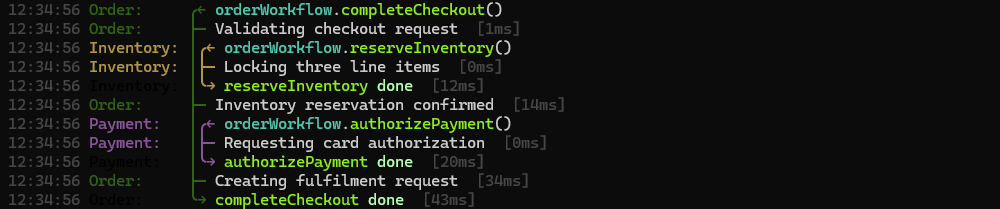
Automatic traces nest naturally. This order workflow produces an order box, a nested payment box, and a contextual order milestone. A direct logger call belongs to the payment box.
async function chargePayment(orderId: string) {
Loxer.m('PAYMENT').debug('Calling payment provider', { orderId });
return { orderId, authorized: true };
}
trace.PAYMENT.info(chargePayment, { closeMessage: 'fn(result)' });
async function submitOrder(orderId: string) {
trace.point.ORDER.info('fn', 'Order accepted', { orderId });
const payment = await chargePayment(orderId);
return { orderId, payment };
}
trace.ORDER.props('result').info(submitOrder, { openMessage: 'parent.fn(args)' });
This pattern works for any operation with meaningful internal stages: a request that calls several services, a job that processes a batch, a browser action that coordinates UI and network state, or a server operation that needs a clear failure trail.
Start where you are
| Goal | Recommended path |
|---|---|
| See a working trace in minutes | Five-minute Vite quick start |
| Add tracing to an existing Vite, Babel, test, or Node build | Integration guide |
| Learn markers, messages, props, and async behavior | Tracing guide |
| Configure modules, logs, manual boxes, history, and output | Logging and output guide |
| Diagnose a missing transform or missing output | Reference and troubleshooting |
| Inspect every exported type and option | Generated API reference |
Important operating facts
- Initialize Loxer early in each JavaScript realm. Logs produced beforehand wait in a bounded queue containing the oldest 1,000 records; an undrained queue reports a one-time warning after five seconds.
- Every loaded copy in one realm shares a
globalThis-backed instance. A worker, iframe, and server process are separate realms and each need initialization. - Every value after a message is a prop. Render props with
pp()when people need to inspect them; bound broad values withdepthorkeys. - Messages, arguments, results, errors, and props are caller data. Loxer does not redact them. Apply filtering, retention, access, encryption, and deletion policy at the output destination.
- A
tracemarker must pass through the Vite or Babel transform. An untransformed marker throws a configuration error, making a missing build step visible.
Package facts
- ESM-only package with TypeScript declarations.
- Node 20 or newer for
loxer; Node 20.19 or newer for the Babel and Vite trace plugins. - Vite 5–8 and Babel 7.26.10 or Babel 8 are accepted by the shipped adapters.
- Zero runtime dependencies.
- MIT © Christian Prinz.